🧱 System Architecture — Windows 11 PCI DSS Hardening
This architecture defines the secure foundation of a Windows 11 workstation hardened to meet PCI DSS v4.0 requirements for protecting sensitive financial and cardholder data.
Unlike traditional multi-server environments, this design demonstrates endpoint-centric compliance — ensuring a single workstation can be PCI-aligned when configured and monitored correctly.
🖥️ High-Level Overview
The workstation environment is structured around five key security layers:
| Layer | Component | Purpose |
|---|---|---|
| 1️⃣ Hardware & Firmware | TPM 2.0, Secure Boot, BIOS password | Ensures trusted hardware and prevents firmware tampering. |
| 2️⃣ Operating System | Windows 11 Pro / Home (hardened) | Base layer configured with Group Policy, firewall, and encryption. |
| 3️⃣ Security Controls | BitLocker, Defender, Malwarebytes | Full-disk encryption and dual-layer malware protection. |
| 4️⃣ Update & Patch Management | Patch My PC, Windows Update | Maintains current patch levels and closes vulnerabilities. |
| 5️⃣ Monitoring & Logging | GlassWire, Event Viewer, PowerShell transcripts | Provides visibility and traceability of all activities. |
🌐 Network Path & Segmentation
The system operates within a segmented home/office lab environment that emulates PCI DSS network separation.
All connections are routed through an encrypted and monitored VLAN.
flowchart TB
    ISP["ISP Router"]

    subgraph NETWORK["SEGMENTED NETWORK"]
        direction TB
        ROUTER["GL.iNet MT6000"]

        subgraph PCI["VLAN 2 - PCI ZONE"]
            direction LR
            VOIP["Polycom VVX311 Encrypted SIP/TLS"]
            WS["Windows 11 PCI-DSS Hardened"]
        end
    end

    ISP --> ROUTER
    ROUTER --> PCI

    style NETWORK fill:#f8fafc,stroke:#334155,stroke-width:2px
    style PCI fill:#e0f2fe,stroke:#0284c7,stroke-width:2px
Figure: Network segmentation diagram showing ISP router connecting to GL.iNet MT6000 router, which isolates VLAN 2 (PCI Zone) containing the Windows 11 PCI-DSS hardened workstation and Polycom VVX311 encrypted VoIP phone.
Each VLAN enforces: - Strict inbound/outbound rules - No peer-to-peer workstation visibility - TLS-only traffic for remote updates and VoIP control channels
🧩 Core Components
| Component | Role | PCI DSS Alignment |
|---|---|---|
| BitLocker | Encrypts all drives with TPM key storage | Req. 3 – Protect Stored Data |
| Windows Defender | Provides anti-malware protection and behavior-based analysis | Req. 5 – Anti-Virus Software |
| Malwarebytes | Adds heuristic and web-threat defense | Req. 5 – Layered Protection |
| Patch My PC | Automates Windows and third-party updates | Req. 6 – Security Patching |
| Macrium Reflect | Validates recoverability via full-disk imaging | Req. 10 – Log & Audit Integrity |
| GlassWire | Monitors network traffic, alerts on anomalies | Req. 11 – Regular Testing |
| Firewall (All Profiles) | Blocks unsolicited inbound connections | Req. 1 – Network Protection |
| Event Viewer & PowerShell Logs | Captures full audit trails | Req. 10 – Logging and Monitoring |
🧠 Logical Architecture Diagram
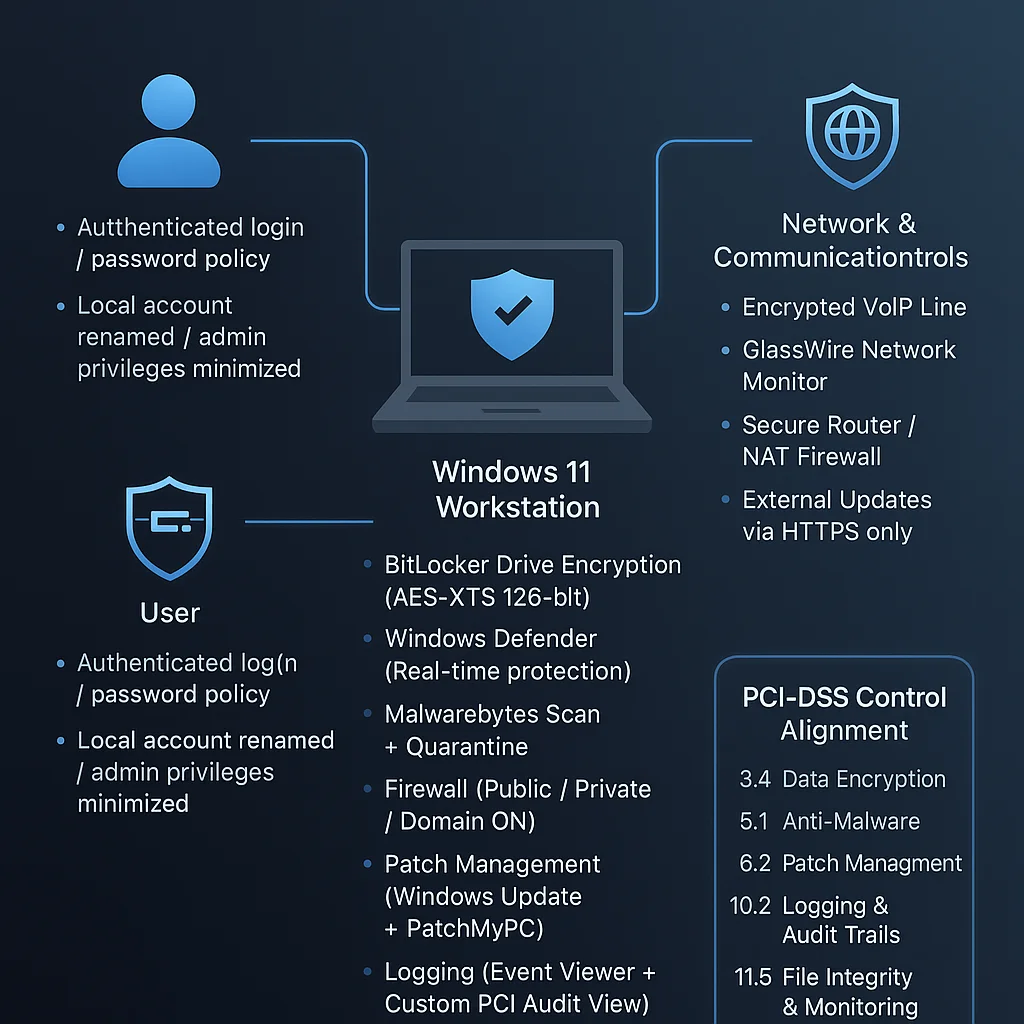 Figure: Logical PCI-DSS endpoint architecture — encryption, monitoring, and audit layers.
🔐 Security Control Summary
| Security Area | Implementation |
|---|---|
| Disk Encryption | BitLocker (AES-XTS 256-bit, TPM-sealed) |
| User Separation | AdminLocal for maintenance, StandardUser for daily use |
| Network Firewall | Domain, Private, and Public all active |
| Update Management | Automated via Patch My PC |
| Malware Defense | Real-time protection + weekly deep scans |
| Backups | Full-image backups stored offline, verified monthly |
| Logging | Event logs archived with timestamp validation |
| Monitoring | GlassWire continuous outbound alerting |
⚙️ Implementation Highlights
- TPM Verification
- Confirmed TPM 2.0 active and owned by the OS.
-
BitLocker configured for hardware binding and PIN unlock (optional).
-
Secure Boot Enforcement
-
Verified UEFI Secure Boot enabled and integrity checked.
-
Firmware Protection
-
BIOS password applied, boot order locked.
-
User Account Policy
- AdminLocal for administrative tasks only.
-
StandardUser for all operational use.
-
Audit Log Retention
- Minimum retention: 90 days local, 365 days backup images.
🧩 Alignment with PCI DSS v4.0 Objectives
| PCI Objective | Implementation Example |
|---|---|
| Build and Maintain a Secure Network | Windows Firewall + VLAN segmentation |
| Protect Cardholder Data | Full disk encryption and TLS enforcement |
| Maintain a Vulnerability Management Program | Patch My PC + Defender updates |
| Implement Strong Access Control | User separation, password policy, 2FA readiness |
| Regularly Monitor and Test Networks | GlassWire, event log review |
| Maintain an Information Security Policy | Documented local security policy and backup SOP |
🧾 Summary
This design illustrates that PCI DSS compliance can extend to individual endpoints when proper configuration, segmentation, and monitoring are applied.
The system demonstrates zero cloud dependency, full offline recoverability, and persistent audit traceability — all essential to PCI DSS assurance.
Validated on Windows 11 23H2 (Build 22631.2715) — all screenshots captured from live hardened deployment.