PCI DSS Compliance — Windows 11 Secure Workstation Design
For recruiters & hiring managers
What: Complete PCI-DSS aligned endpoint hardening with BitLocker encryption, layered malware defense, patch automation, network monitoring, and comprehensive evidence pack — delivered in under 48 hours.
Why this matters for GRC: Demonstrates rapid compliance control implementation, endpoint hardening expertise, evidence-first documentation, and PCI DSS framework mapping.
Impact: Production-ready secure workstation built from incident response to fully compliant system in <2 days with complete audit trail.
Skills: PCI DSS v4.0 · Endpoint Hardening · BitLocker · GPO · Windows Defender · Patch Management · Evidence Collection · Control Mapping · Compliance Documentation
Completed: November 2025
"Compliance isn't a product — it's an environment."
This project originated from a real-world incident where a mortgage company issued a workstation that was entirely unsecured — no disk encryption, no malware protection, and containing residual client data from previous users.
To address this, I designed and documented a standalone Windows 11 hardening architecture aligned with PCI DSS v4.0 — practical for small businesses yet compliant with enterprise-grade security expectations.
🧩 Project Summary
| Category | Description |
|---|---|
| Objective | Remediate unsecured Windows workstations by implementing PCI DSS-aligned controls for encryption, malware defense, patch management, and audit integrity. |
| Environment | Windows 11 Home / Pro (standalone) |
| Focus Areas | Endpoint hardening, encryption, access control, patch automation, logging, and network monitoring. |
| Outcome | Delivered a hardened Windows 11 workstation image with full-disk encryption, layered malware defense, auditable logs, and network visibility via GlassWire. |
🏗️ System Overview
This project demonstrates a PCI DSS-ready endpoint built from standard Windows components and open tools — no external cloud stack required.
The system integrates:
- BitLocker — Full disk encryption with TPM protection for data-at-rest security.
- Windows Defender + Malwarebytes — Dual-layer anti-malware protection and on-demand scanning.
- Windows Firewall (All Profiles) — Domain, private, and public firewalls all enforced.
- Patch My PC — Automated third-party software updates to maintain PCI DSS requirement 6.2 compliance.
- Macrium Reflect — Secure local backup and recovery validation.
- GlassWire — Real-time network monitoring and connection alerts.
- Event Viewer + PowerShell Logging — Comprehensive audit trail aligned with PCI DSS logging requirements.
- Secure Network Path — Router with hardware firewall → Encrypted VoIP phone → Workstation (isolated VLAN).
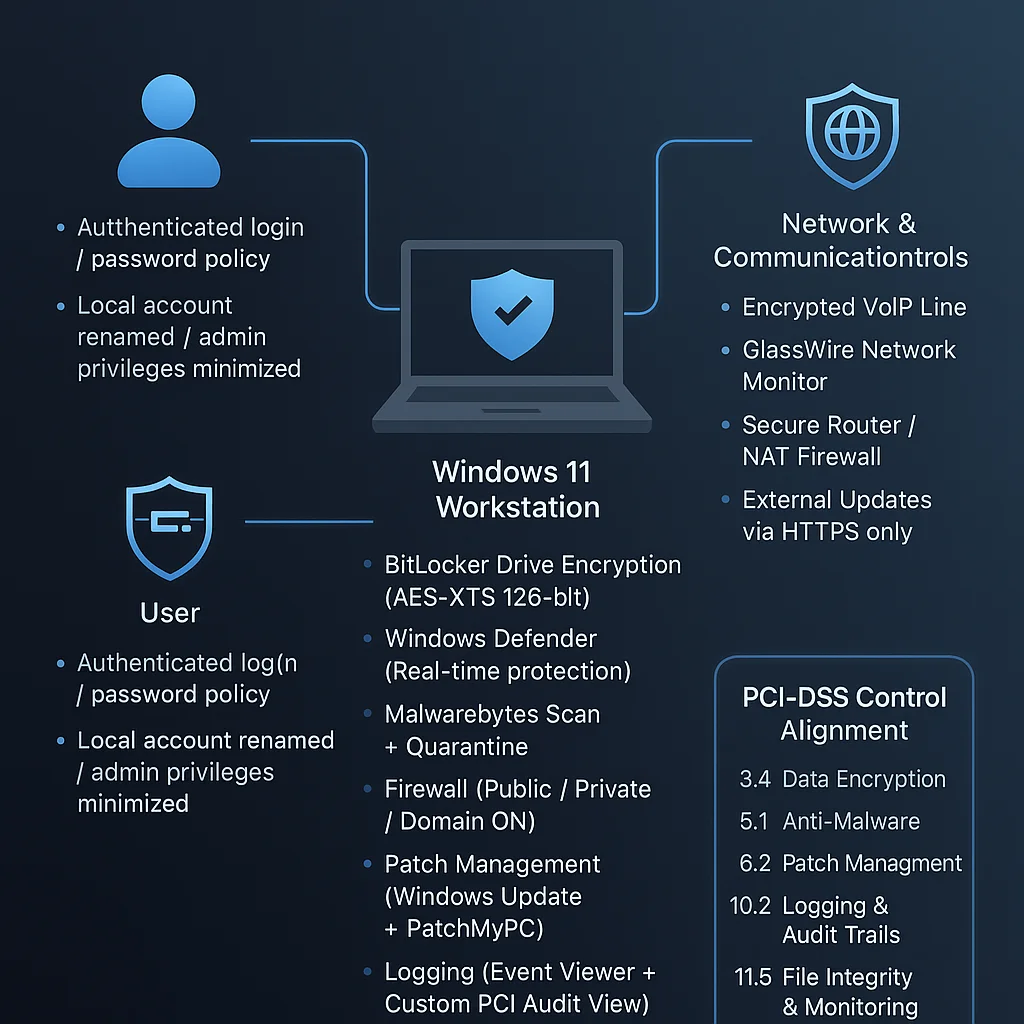 Figure: Windows 11 PCI-DSS Hardening — Secure standalone workstation architecture.
🔒 Core PCI DSS Controls Implemented
| PCI DSS Control | Implementation Summary |
|---|---|
| Req. 3: Protect Stored Cardholder Data | BitLocker full-disk encryption with TPM binding and recovery key escrow. |
| Req. 5: Protect Systems Against Malware | Microsoft Defender and Malwarebytes, with daily updates and scheduled scans. |
| Req. 6: Maintain Secure Systems | Patch My PC automates Windows and third-party updates with verification logging. |
| Req. 7: Restrict Access to Cardholder Data | Windows account separation (AdminLocal / StandardUser) and password policies. |
| Req. 10: Log and Monitor Access | Event Viewer, PowerShell transcript logging, and daily Macrium Reflect backup validation. |
| Req. 11: Regular Testing | Controlled vulnerability scans and GlassWire monitoring to detect anomalies. |
⚙️ Hardening & Verification Steps
- Enable BitLocker via Control Panel → Device Encryption → TPM-backed drive protection.
- Configure Defender & Malwarebytes for scheduled scans and real-time protection.
- Verify Firewall Profiles — ensure Domain, Private, and Public are active.
- Run Patch My PC weekly to validate all software versions are current.
- Perform Full System Backup using Macrium Reflect (verify image integrity).
- Enable Audit Policies:
- Logon/Logoff events
- Account lockouts
- Object access
- Process creation
- Use GlassWire to monitor outbound connections and flag unauthorized traffic.
📁 Subpages
- System Architecture
- Implementation Guide
- Security Controls Mapping
- Compliance Verification
- Lessons Learned
🧠 Lessons from the Field
This project emphasizes that endpoint negligence — even in small businesses — can lead to catastrophic PCI DSS violations.
By focusing on workstation-level controls, this design proves that PCI DSS compliance is achievable without enterprise infrastructure, provided each device is hardened, logged, and encrypted.
All content is educational and sanitized for portfolio demonstration. No production systems, credentials, or client data are included.